| Detailed Instructions for Page Setup
Please scroll down on this page to view all of our content and printable items. | | Printable Greeting Card Section Contents | |
|
| Page set up instructions |
|
How to keep the web address from printing on the front of your card
in little black letters along with the time and date and page number.
Printfree.com was designed to print items using your web browser and add text
using forms. This keeps us (a very small part time business) from buying expensive
software, which in turn allows us to keep the site free to our visitors and let
advertising keep it going. The other good thing about using your web browser
is that you don't have to worry about downloading a program that might
have bugs in it and mess up your computer.
The down side to all of this is that you will need to adjust a few settings to get
the good looking printed items you want by reading a few directions. You will
know a little bit more about your computer and how to better print items from
the rest of the web from what you learn here.
From the very top left corner of your web browser, click on the
word File. This will open a box (pull down menu) with about a
dozen selections in it. Use your mouse pointer and click on
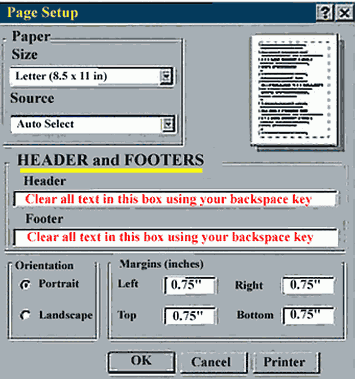
Page Setup with the left button. This will open a dialogue box
similar to the following:
The page setup on the new Internet Explorer 7 can be found by clicking
the arrow beside the printer icon and selecting the page setup text.
In the 2 boxes under Header and
Footer you will find some strange
letters and symbols that are along
the lines of this:
Header:
&w&bPage &p of &P
Footer:
&u&b&d
These letters are what tell your
printer to print those little letters
at the top of the page (header),
and at the bottom of the page
(footer).
You need to clear these by clicking
your mouse in the box at the end
of the text and using your
backspace key to delete them.
|  | It would be a good idea to write down on a piece of paper
the symbols in the boxes on your computer, in case you ever
wish to turn the feature back on.
| Also notice that this box contains the orientation for the way
the page is going to print, (Portrait is correct for all items on
this site unless there are specific instructions otherwise.)
The only items that are not portrait are a few new customizable
horizontal calendars.
All items are designed to use the 0.75" margins when using standard
8.5" X 11" paper. Foreign users with different paper may need to
make adjustments here.
You can also access your printer setup from here.
Click here for a printable copy of these directions. |
|
|
